What Kind of Photos Do I Need for an AI Headshot? (You Probably Already Have Them)
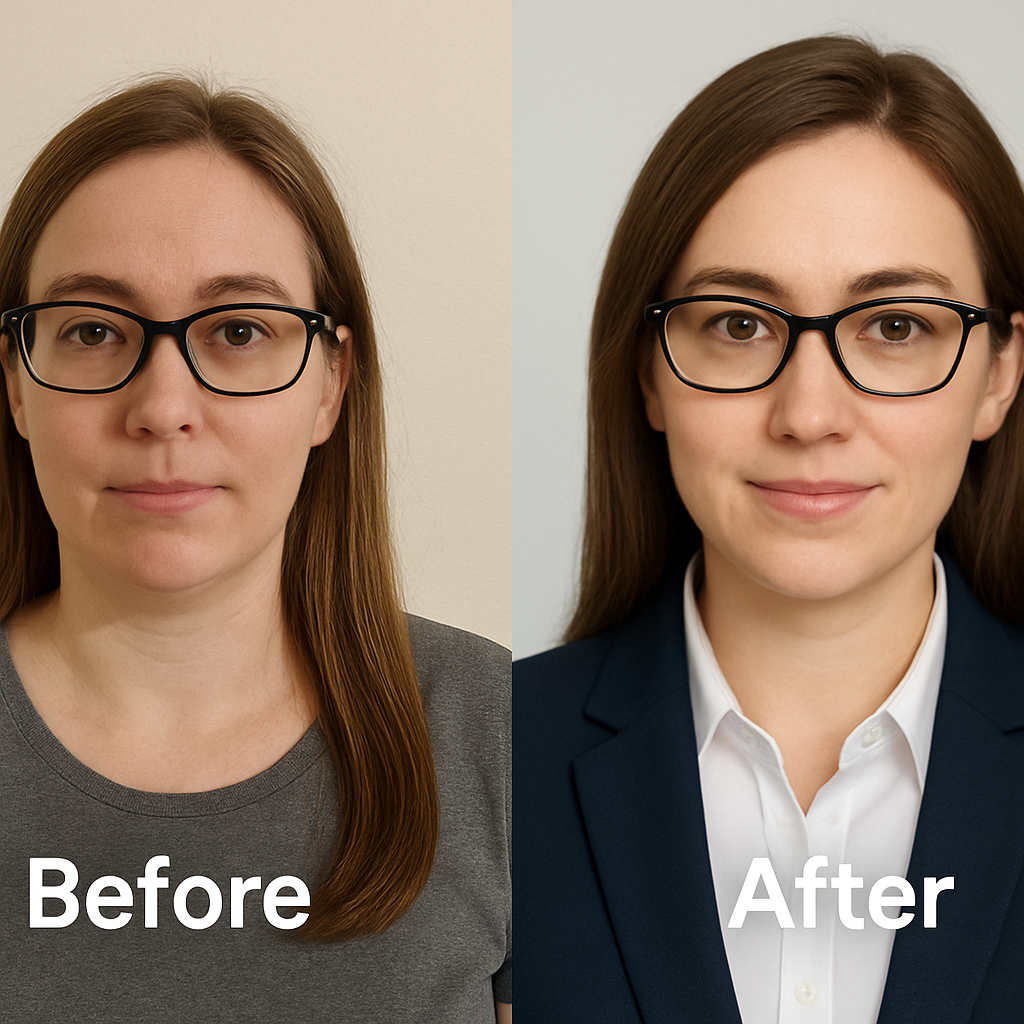
The most common friction point in adopting AI-generated photography isn't technology. It is psychology. Users often approach AI headshot generators with a legacy mental model rooted in traditional studio photography. They assume that to get a high-quality output, they must supply a high-quality input. They believe they need "professional" source photos to get a professional result.
This assumption is fundamentally incorrect. In fact, it is often inversely correlated with success. The algorithms driving modern generative AI do not need polished, color-graded studio portraits. They need raw data. They need clarity. They need to understand the geometry of your face without the interference of artistic lighting or heavy editing.
When you use NovaHeadshot, the goal is not to enhance a single photo. It is to learn your identity and reconstruct it in a new, professional context. This means the best photos for the job are likely already sitting in your camera roll. You do not need a photographer. You do not need a scheduling tool. You just need to understand the data requirements of the model. If you are ready to skip the studio logistics and move straight to results, you can start your headshot transformation now.
The 3 Things Your Photos Must Have (Before Anything Else)
Before we discuss quantity or variety, we must address the baseline quality of the data you provide. In machine learning, the principle of "garbage in, garbage out" is ironclad. If the input data is compromised, no amount of algorithmic sophistication can fix the output. However, "quality" in this context does not mean "artistic merit." It means data integrity.
1. Your Face Is Clear and in Focus
The primary function of the AI during the training phase is feature extraction. The model scans your uploaded images to build a mathematical representation of your facial features. It measures the distance between your eyes, the curvature of your nose, and the texture of your skin.
If an image is blurry, the model cannot extract these feature vectors accurately. Research into facial recognition systems demonstrates that resolution and focus quality are the primary determinants of identity verification accuracy. When you feed the model a blurry image, it introduces "noise" into your identity profile. The AI begins to guess at the details of your eyes or skin texture.
This leads to generated results that look "soft" or slightly unlike you. To avoid this, perform a simple self-check: zoom into your face on the photo. If the eyelashes and skin texture remain sharp, the data is usable. If the details smudge into pixels or motion blur, discard it. You are better off with fewer, sharper images than a large volume of low-quality data.
2. Natural, Unfiltered Look
This is the single most significant source of failure for new users. We live in an era of algorithmic beauty filters. Apps like TikTok and Instagram use real-time processing to smooth skin, enlarge eyes, and adjust facial geometry. While these filters might make a selfie feel more flattering, they are poison for AI training.
Studies analyzing the impact of beauty filters on facial recognition have found that tools like the "Bold Glamour" filter do not just smooth skin. They fundamentally alter facial structure. They increase lip fullness, project the cheekbones, and rotate the nasal tip. When you upload photos with these alterations, you are effectively training the AI on a different person.
If NovaHeadshot learns your face from filtered images, it will generate a "plastic" version of you. It learns the artifacts of the filter as if they were your biological features. For the most professional results, you must strip away the digital layers. Use normal camera photos. Real skin texture, with all its minor imperfections, provides the friction the AI needs to generate a believable, human image.
3. Recent Photos That Still Look Like You
Temporal specificity is a concept often overlooked in dataset curation. Your face is not a static object. It changes over time due to aging, weight fluctuations, and style choices. If you train a model on photos spanning five years, you are forcing it to reconcile conflicting data points.
The model receives one data point saying your face is rounder with short hair, and another saying it is leaner with long hair. In an attempt to resolve this conflict, the AI generates an average. The result is a "hybrid" headshot that looks like a vague, unconvincing version of you.
Data from 2026 suggests that the optimal window for input photos is the last 1 to 2 years. If you have undergone a significant change, such as growing a beard or losing weight, your input window should strictly start after that change occurred. If you would not use the photo on LinkedIn today because it no longer resembles you, it has no place in your training set.
How Many Photos Do I Actually Need?
There is a prevalent misconception that "more data is always better." While this is true for training massive foundation models like GPT-4, it does not apply to fine-tuning a model on a single subject. In fact, providing too much data can lead to a phenomenon known as data dilution.
The Sweet Spot: 8–15 Photos
Research into Low-Rank Adaptation (LoRA) training—the technique often used for personalized image generation—identifies a specific efficiency curve. Practitioners have found that 8 to 15 high-quality images represent the optimal balance for individual identity training.
Below 8 images, the model may struggle to separate your identity from the background noise. It simply does not have enough angles to construct a full 3D understanding of your face.
Above 20 or 30 images, you hit diminishing returns. Worse, you increase the likelihood of introducing "bad data"—outliers with poor lighting, odd expressions, or older appearances that degrade the overall model quality. NovaHeadshot is calibrated to maximize performance within this 8–15 image range. It is a manageable number that allows for strict quality control without requiring a professional photoshoot.
If you are unsure whether you have enough usable photos, do not force it. It is better to start with what is on your camera roll and let the platform guide you. See how our platform works to understand the upload process better.
The Ideal Mix: Angles, Expressions, Backgrounds, and Outfits
Quantity is secondary to diversity. A dataset of 15 photos is useless if every single one is a selfie taken from the exact same high angle in your bedroom. To build a robust model, you need to provide data that helps the AI understand your face as a three-dimensional object.
Angles: Don't Just Use the Same Selfie Pose
The AI needs to "see" around the corners of your face. Research on 3D face reconstruction indicates that models trained on multi-view images are significantly more accurate than those trained on frontal views alone.
You should aim for a distribution like this:
- 3–5 photos, straight-on: Looking directly at the camera lens. This establishes the baseline geometry of your eyes and nose.
- 3–5 photos, slight ¾ angle: Turn your head subtly to the left or right. This reveals the jawline and cheekbone depth.
- 1–2 side or candid angles: Photos taken while you are walking or talking. These provide "ground truth" for how your face moves naturally.
This variation allows the AI to map your features in 3D space, ensuring that your generated headshots look like you from every professional angle, not just your "good side."
Expressions: Subtle Variety, Still "Professional You"
Your goal is a professional headshot, which typically implies a sense of competence and approachability. However, training exclusively on one expression can lead to overfitting. If you only upload photos where you are laughing, the AI may struggle to generate a serious, composed headshot.
Include a mix of:
- Neutral expressions: Mouth closed, eyes relaxed.
- Soft smiles: Friendly but controlled.
- Genuine smiles: Teeth visible, eyes engaged (the "Duchenne smile").
Avoid extreme outliers. Mid-shout party photos or exaggerated "duck face" selfies introduce geometric distortions that confuse the model. NovaHeadshot is optimized for professional utility, so the inputs should reflect the range of expressions you would be comfortable showing a client or employer.
Backgrounds: Variety Helps, But Doesn't Need to Be Perfect
One of the technical challenges for AI is "disentanglement." The model needs to learn which parts of the image are you and which parts are the environment. If every photo you upload is taken against a white wall, the AI might mistakenly learn that "white wall" is a fundamental part of your facial identity.
By varying your backgrounds, you help the AI separate the signal (your face) from the noise (the room).
- Indoors: Offices, living rooms, coffee shops.
- Outdoors: Shade, city streets, parks.
- Neutral walls: Gray, brick, or textured surfaces.
You do not need to worry about the aesthetic quality of the background. NovaHeadshot will replace it entirely. You just need enough variety to teach the model that you exist independently of your surroundings.
Outfits: You Don't Need a Suit in Every Picture
A common anxiety is the wardrobe. Users often scramble to find photos of themselves in suits. This is unnecessary. The AI is primarily learning your face and neck structure. While the clothing in your input photos helps the model understand your body type, the generative process can easily re-clothe you.
Focus on:
- Everyday work-appropriate clothes: Button-downs, blouses, clean t-shirts, sweaters.
- Neck visibility: Avoid scarves or turtlenecks that obscure the jawline in every shot.
- Authenticity: Wear what you actually own.
The key point here is that NovaHeadshot can synthesize formal attire—blazers, suits, professional dresses—even if your input data is casual. The photos do not need to be styled like a photoshoot. They just need to clearly identify you.
Photos You Probably Already Have That Work Great
The barrier to entry for AI headshots is much lower than people realize. You likely have a sufficient dataset on your phone right now. You just need to know where to look.
These Are Often Perfect (and You Don't Realize It)
Stop looking for "portraits" and start looking for "data." Go hunting in your camera roll from the last 12–18 months.
- Candid photos from friends: These are often the best sources of data because they are taken from a conversational distance (3-5 feet), which avoids the lens distortion typical of arm-length selfies.
- Travel photos: We tend to take more photos when we travel. Look for shots where you are not squinting into the sun. Overcast days or open shade provide excellent, soft lighting.
- Work events: Photos from conferences, meetups, or office parties often capture you in "professional mode" but with natural lighting and expressions.
From these sources, crop in. You don't need the full landscape. If the photo is high resolution, a crop of your head and shoulders is perfect. NovaHeadshot turns these ordinary, incidental moments into studio-quality assets.
Common Mistakes That Ruin AI Headshot Quality (and How to Fix Them)
We have analyzed thousands of user uploads. The failures are rarely due to the AI "not working." They are almost always due to specific patterns of bad input data. Avoiding these five mistakes will put you in the top 1% of users.
1. Using Only Filtered or Edited Photos
Problem: Heavy filters create a smoothing effect that wipes out skin texture. The AI interprets this as a lack of detail and generates "waxy" or cartoonish faces. Fix: Swap them for the original versions. If you only have the edited version, delete it. Prioritize newer, raw photos, even if the lighting isn't "influencer perfect."
2. Everything Taken in the Same Pose and Same Room
Problem: Overfitting. If 100% of your data shows you with your head tilted to the left in your bedroom, the AI will assume you always look like that. It will struggle to generate straight-on shots or different backgrounds. Fix: Force variety. Add 3–5 photos from different days or locations. Even a single outdoor shot can break the pattern and significantly improve the model's generalization capabilities.
3. Very Old Photos Mixed with Very New Ones
Problem: Identity conflict. As discussed, the model cannot reconcile a 2018 version of you with a 2026 version. Data consistency is crucial for sharp results. Fix: Be ruthless with the timeline. Stick to one "era" of yourself. If you look significantly different today than you did two years ago, the old photos must go.
4. Group Photos Where Your Face Is Tiny
Problem: Low resolution features. If your face takes up only 5% of the image, the pixel density is too low for accurate feature extraction. The AI has to "hallucinate" the details, leading to inaccuracies. Fix: Crop the photo tightly around your head and shoulders. If the result is blurry or pixelated after cropping, skip it. The face must fill a meaningful portion of the frame to be useful.
5. Dark, Backlit, or Super Grainy Photos
Problem: Loss of information. Shadows obscure facial geometry. Grain (noise) looks like texture to the AI, which can result in generated images with rough or "dirty" looking skin. Fix: Prioritize light. Window light is the gold standard for amateur photography. If a photo is dark or backlit, no amount of AI processing can recover the missing data.
Quick Checklist: Is This Photo Good Enough for NovaHeadshot?
You can triage your photos in seconds using a simple binary assessment. Ask these five questions for every photo you intend to upload:
- Can I clearly see my eyes and facial features when I zoom in?
- Is my face mostly facing the camera (not fully turned away)?
- Is there no heavy beauty or cartoon filter on the image?
- Was this taken within the last 1–2 years?
- Would I be okay if a recruiter or client saw me looking like this?
If you can answer "yes" to at least 4 of these 5 questions, the photo is safe to include. This checklist ensures you meet the technical threshold for feature extraction without getting bogged down in artistic perfectionism.
How NovaHeadshot Uses Your Photos to Create Studio-Quality Results
Understanding the "black box" can help you trust the process. The technology behind NovaHeadshot is not a simple copy-paste editor. It is a generative pipeline.
From Camera Roll to Professional Headshots in Minutes
When you upload your 8–15 photos, the system initiates a complex workflow:
- Analysis: The AI scans your uploads to extract identity feature vectors—the mathematical code that defines your face.
- Training: A temporary, personalized model is fine-tuned on your specific features. This takes minutes, compared to the days or weeks required for traditional model training.
- Synthesis: The model generates new images pixel by pixel. It combines your identity vectors with "style vectors" that define professional lighting, clothing, and backgrounds.
- Selection: You download the variations that best represent your professional brand.
This process decouples your physical location from the result. You get studio-quality results without the studio price, and more importantly, without the studio time commitment. The AI fills in the gap between your casual input and the professional output you need for your career.
Examples: "Is This Photo OK?" (Scenario-Based Guidance)
To make this concrete, let's look at common scenarios.
- Mirror selfie in a well-lit bathroom, no filter: Usually fine. As long as the phone isn't covering your face and the mirror is clean, the lighting is often surprisingly good.
- Outdoor photo at golden hour, you're centered and in focus: Great. This is high-quality data. The directional light helps define facial structure.
- Dark bar photo with neon lights and heavy grain: Skip. The color casts and noise will confuse the skin tone analysis.
- Group picture where you're in the back row: Only if you can crop tightly. If cropping makes it blurry, discard it.
- Wedding guest photo in a suit/dress, taken by a photographer: Excellent. Even if it's a bit older (within 2 years), the high resolution and professional lighting provide a strong anchor for the model.
- Gym selfie with harsh fluorescent lighting: Usually avoid. Unless it is very clear, the overhead lighting often creates unflattering shadows under the eyes (raccoon eyes) that the AI might replicate.
The Path to a Stress-Free Professional Upgrade
The barrier to updating your professional image is no longer cost or logistics. It is simply curation. You do not need to book a photographer. You do not need to buy a new suit. You just need to spend ten minutes in your camera roll applying the filters of clarity, recency, and authenticity.
By selecting 8–15 clear, unfiltered photos, you provide NovaHeadshot with the raw material it needs to construct a highly accurate, professional model of you. This is the highest-leverage activity you can perform for your personal brand today. The technology handles the lighting, the background, and the styling. You just handle the identity.
You don't need a perfect photoshoot. You just need the photos you already have. Upload them to NovaHeadshot and upgrade your digital presence in minutes.
Ready to Create Your Professional Headshots?
Transform your selfies into professional headshots in under 20 minutes. Join thousands of professionals who trust Nova Headshot for their AI-generated headshots.