The 4‑Step Guide to Getting Perfect AI Headshots (Every Time)
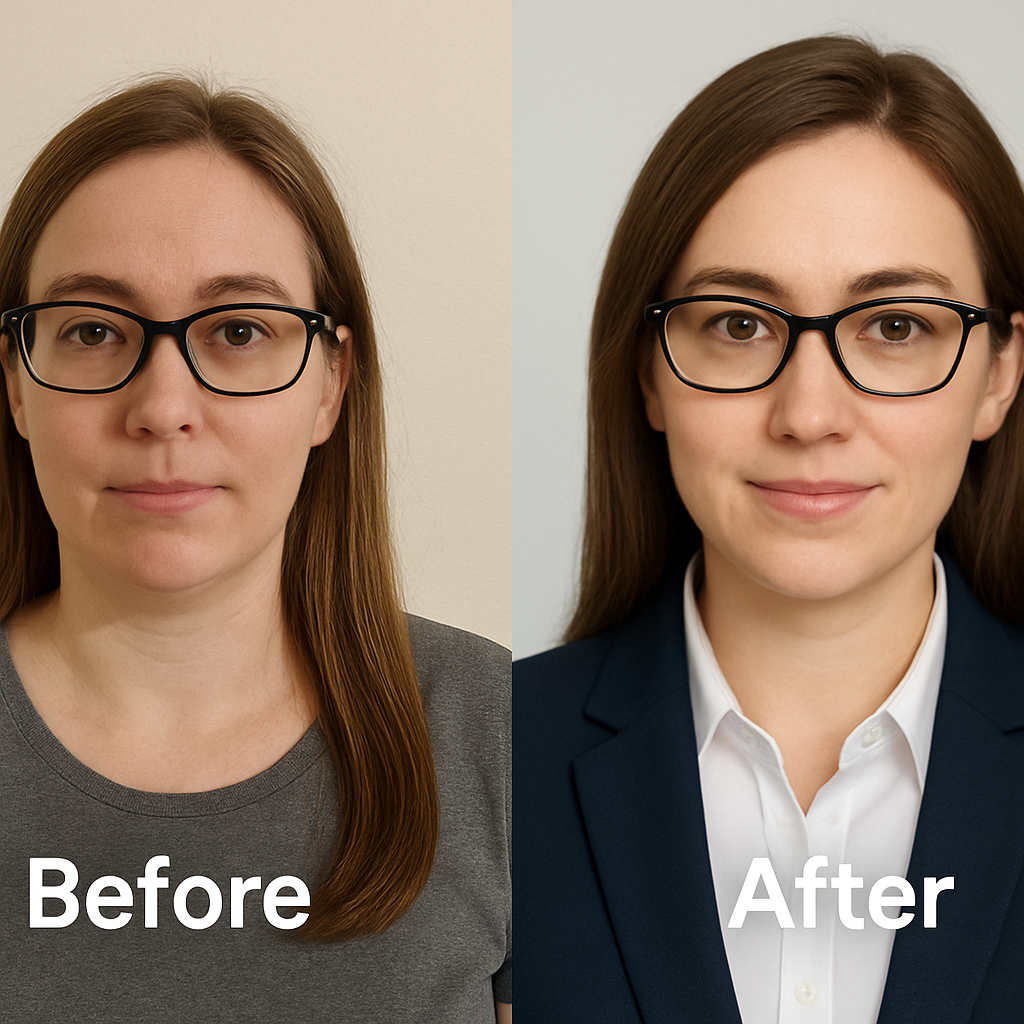
It is 2026. The days of booking a $300 photoshoot, waiting a week for proofs, and hoping the photographer caught your "good side" just to update your LinkedIn photo are effectively over. AI headshot tools have fundamentally shifted the economics of professional photography. They have democratized access to high-end imagery. However, they have also introduced a new variable into the equation: inconsistency.
Some users walk away with crisp, studio‑quality portraits that look indistinguishable from a session with a top-tier photographer. Others end up with plastic skin, warped features, or images that simply do not look like them. The difference between these two outcomes is rarely luck. It is process. There is a specific mechanism to this technology. If you understand the inputs, you can control the outputs.
This article outlines the definitive framework for generating professional AI headshots that look authentic and authoritative. We will dismantle the "black box" of image generation and give you a step-by-step protocol. When you use a dedicated tool like NovaHeadshot, following this guide ensures you move from "hoping for a good result" to predictable, high-quality success.
We will cover:
- The precise data inputs required for identity consistency
- How to leverage color psychology and style matching
- The mechanics of posing that translate best to AI models
- The filtering heuristics for selecting your final "hero" image
Let's break it down.
Step 1: Start With the Right Input Photos (This Decides 80% of Your Results)
In the world of data science and AI, there is an axiom that remains undefeated:
Garbage in equals garbage out.
This principle is the single most critical factor in your success. Whether you are using NovaHeadshot or another premium tool, the quality of your input photos dictates approximately 80% of the final quality. The AI model does not "see" you in real life. It only "knows" what you feed it. If you feed it ambiguity, it will return hallucinations.
How many photos should you upload?
Quantity matters, but quality matters more. You need enough data points for the model to map your facial geometry, but not so much that you introduce noise.
For optimal results, aim for 10–20 photos.
There is a technical reason for this range. Research on training data indicates that with fewer than 6–8 photos, the model struggles to triangulate your identity. It lacks the spatial data to construct a consistent 3D representation of your face. Conversely, uploading more than 30 photos often dilutes the identity vectors. You risk introducing too many variables, which leads to generic or "averaged" results that look like a sibling rather than you.
NovaHeadshot is engineered for this specific sweet spot. We require enough variation to separate your features from the environment, but we cap the input to maintain strict identity adherence.
What kinds of photos work best?
You must optimize for clarity. The AI needs to distinguish skin texture from pixel noise.
1. Sharp and in focus Blurry images are fatal to the process. If the source is grainy, the AI interprets that grain as skin texture. This results in the "plastic" or overly smoothed look that screams "fake." High-resolution inputs produce studio-quality results.
2. Unfiltered and unedited This is counter-intuitive for the Instagram generation. You must avoid beauty filters, "portrait mode" artificial blur, or face-reshaping apps. These filters modify your facial landmarks. When the AI trains on modified landmarks, it generates a modified person. Unfiltered photos perform significantly better because they provide the ground truth of your facial structure.
3. Recent and temporally consistent Do not treat the upload process as a "greatest hits" of the last decade. If you mix photos from five years ago with photos from today, the model attempts to merge them. The result is an uncanny hybrid of your younger and older self. Keep the dataset restricted to your current era.
4. Well‑lit Lighting acts as information. Natural daylight or soft indoor light provides the cleanest data. Harsh shadows create "occlusion," where parts of your face are hidden from the model. Colored party lights are equally problematic, as they confuse the model regarding your true skin tone.
5. Face clearly visible Obstructions are errors. Sunglasses, low hats, or hands covering the chin remove critical data points. The model needs a clear view of your key facial landmarks: eyes, nose, mouth, and jawline.
Pro tip: If you have access to a DSLR or a high-end mirrorless camera, include 1–3 of those shots. Even a clean rear-camera shot from a modern smartphone outperforms a front-facing selfie. Real user tests consistently show this boosts realism, especially in skin and hair detail.
How much variety do you need?
You need to teach the AI what is "you" and what is "environment." If every photo is taken in the same room, the AI might think the wallpaper is part of your head.
Vary:
- Angles: Include straight-on shots, ¾ angle shots, and 1–2 mild profiles. Diversity in angles helps the model understand your facial depth.
- Expressions: A mix of neutral and light smiles helps the model understand how your face moves.
- Backgrounds: Mix indoors, outdoors, and plain walls.
Don't vary:
- Hair length: If you have short hair in half the photos and long hair in the others, the AI will likely generate a strange, blurred hair length.
- Facial hair: Decide on your look before you start. Beard vs. no beard creates confusion.
- Age: As mentioned, keep it tight to the present day.
Step 2: Choose a Style That Matches Your Real‑World Brand
One of the distinct advantages of using our AI headshot generator is the ability to generate multiple styles from a single dataset. You are not locked into one look. However, optionality can lead to decision paralysis. To navigate this, you must align the visual output with your professional reality.
If you're using it for LinkedIn, resumes, or company pages…
In these contexts, trust and competence are the currency. You want to minimize distraction.
Prioritize Clean, Neutral Backgrounds Soft gray, white, or gentle gradients are the gold standard. They separate the subject from the noise. Background selection determines visual hierarchy, keeping the viewer's focus strictly on your face.
Leverage Color Psychology Your clothing color sends a signal.
- Blue: Signals trustworthiness and professionalism.
- Gray: Suggests reliability and balance.
- Black: Signals authority and sophistication.
- Color psychology in professional portraiture is a subtle but powerful tool. If you are in finance or law, darker neutrals reinforce authority.
Wardrobe Formality For corporate roles, a blazer or smart jacket is often non-negotiable. For tech and product roles, a neat shirt or smart-casual layers are appropriate. Research shows that wearing formal clothing increases perceptions of power.
With NovaHeadshot, you can select specific "Corporate Studio" or "Modern Office" styles that automatically apply these heuristic best practices to your final images.
If you're using it for personal branding, speaking, or social media…
Here, the goal shifts from "competence" to "connection." You have more latitude to introduce personality.
Contextual Backgrounds Founders and creators often benefit from softer, lifestyle‑style backgrounds. A blurred coworking space, a bookshelf, or a bright office suggests a narrative. It places you in a context of work and creativity.
Approachable Styling Coaches and speakers often perform better with warm lighting and open body language. A tie might be too rigid; an open collar or casual blazer suggests accessibility.
Key principle: Your AI headshot should look like a better‑lit, better‑composed version of the real you. It should not look like a different person living a different life. Brand consistency across platforms—using the same headshot on LinkedIn, your website, and your email signature—builds trust.
Step 3: Nail Expression, Pose, and Framing (So the AI Has Something Great to Work With)
NovaHeadshot handles the heavy lifting of lighting and rendering, but your input photos determine the micro-expressions and posture. The AI is an amplifier. If you feed it stiffness, it amplifies stiffness. If you feed it confidence, it amplifies confidence.
Expression: The Science of the "Duchenne Smile"
When deciding between a smile and a serious look, look at the data.
The "Duchenne smile" is characterized by the contraction of the zygomatic major muscle (raising the corners of the mouth) and the orbicularis oculi (creating crinkles around the eyes). This is scientifically recognized as the gold standard of authenticity.
More importantly, eye engagement—often called "smizing"—is critical. Research confirms that eyes showing genuine warmth generate 75.93% higher perceived competence compared to blank expressions.
Best choices:
- Neutral face with relaxed jaw: This conveys control and composure.
- Genuine smile: Focus on engaging the eyes, not just the mouth.
Avoid:
- Forced grins: These read as insincere.
- Exaggerated expressions: Duck faces or intense smoldering confuse the mapping of facial features.
Pose and body angle
You do not need to be a professional model, but you should adhere to the geometry of a good portrait.
The 15–30° Turn Avoid facing the camera dead-on with square shoulders, which can look like a mugshot. Instead, turn your shoulders slightly (about 15–30°) away from the camera, then turn your head back to face the lens. This classic, flattering setup adds dimension to the image and projects confidence.
Chin Discipline Push your face slightly forward and tip your chin down a fraction of an inch. This defines the jawline and reduces the "looking down your nose" effect. Head angle communicates specific emotions; a slight tilt suggests engagement, while a lifted chin can inadvertently signal arrogance.
Framing your original photos
When capturing your input shots, frame from the mid‑chest or shoulders up. Leave some "headroom" (space above your head). This gives the AI context for your neck and shoulder structure. Framing from the mid-chest provides the optimal amount of body data without wasting pixels on your legs or shoes.
Step 4: Review, Refine, and Select Your "Hero" Headshots
Once the generation process is complete, you will receive a batch of professional headshots. This usually happens in the 10–20 minute range with NovaHeadshot. Now, you must switch from "creator" to "editor."
You will not use every image generated. The goal is to find the top 1–5% that perfectly represent you.
How to spot a strong, professional AI headshot
Use this four-point inspection criteria:
- Authenticity: Do you recognize yourself instantly? If you have to squint and say, "Maybe that's me," discard it. Authenticity is the primary metric for success.
- Skin Texture: Look for visible pores and natural variance. Skin texture is the most reliable indicator of realism. If the skin looks like polished porcelain, it fails the uncanny valley test.
- Eye Symmetry: Check the pupils and the catchlights (the reflection of light in the eye). They should be symmetrical and clear.
- Brand Alignment: Does this specific image tell the story you want to tell?
Common AI "tells" (and how to avoid them)
Premium tools like NovaHeadshot use advanced diffusion models to minimize artifacts, but you should still scan for common errors.
- Accessories: Watch for mismatched earrings or glasses frames that blend into the skin.
- Hairlines: Ensure the transition from forehead to hair looks natural, not painted on.
- Hands: If a hand appears in the frame (which we generally avoid in headshots), check the finger count.
Picking your primary and backup headshots
You need a portfolio, not just one photo.
The Hero Shot: This is your LinkedIn profile picture. It should be your most engaging, high-eye-contact image with a clean background. The Backup: A secondary option, perhaps more serious or with a different background, for your resume or company directory.
Because our pricing model gives you commercial rights and high‑resolution downloads, you should download a variety. Test them. Ask a colleague or friend, "Which one looks most like me on my best day?"
Why Use NovaHeadshot Instead of Free AI Tools?
You might wonder if you can achieve these results with free tools. The market data suggests otherwise.
There is a significant divergence in the AI landscape between "generators" and "professional tools." Free tools often rely on older, generic models. They lack the specific training on professional portraiture.
The Realism Gap Comparison data from 2025–2026 shows that premium services consistently achieve higher user satisfaction ratings regarding photorealism. Free tools often produce cartoonish or over-stylized results. When your professional reputation is at stake, "cartoonish" is a liability.
Consistency and Volume Free tools often produce 1–2 usable images per batch of 50. Premium services like NovaHeadshot deliver a much higher "hit rate," providing 40–100+ professional-quality variations. This volume is critical for finding that one perfect image.
Privacy and Rights This is the hidden cost of free software. Many free tools lack transparent data policies. Premium services explicitly guarantee photo deletion timelines and commercial rights. With NovaHeadshot, you own your image. We do not use your face to train public models, and your data is handled with strict privacy protocols.
The ROI Calculation Consider the cost of a missed opportunity. Recruiters spend 30 seconds or less on initial profile screenings. In that window, your photo is the primary visual anchor. Profiles with professional headshots receive 14–21 times more profile views. A $29 investment in NovaHeadshot that increases your interview probability is an asymmetric bet with massive upside.
Your 4‑Step Checklist for Perfect AI Headshots
Before you log in to generate your photos, run through this pre-flight checklist. It ensures you have optimized every variable under your control.
-
Upload the right photos
- Secure 10–20 recent, sharp images.
- Ensure no filters are applied.
- Verify lighting is even and natural.
-
Pick a style aligned with your goals
- Select "Corporate" for finance/law, "Creative" for startups/media.
- Choose background colors that leverage psychological trust signals (blues, grays).
-
Let natural expression and posture shine through
- Practice the 15–30° shoulder turn.
- Use a genuine Duchenne smile or a composed neutral look.
- Frame from the chest up.
-
Review and select your best
- Filter for skin texture realism.
- Verify eye symmetry.
- Select a "Hero" shot for LinkedIn and a backup for internal use.
If you follow this process, you remove the randomness from AI generation. You get a predictable, professional asset that elevates your personal brand.
Building Your Professional Visual Identity
We are in an era where your digital presence often precedes your physical presence. Your headshot is the handshake before the handshake. It is the first data point a recruiter, client, or partner consumes about you.
You do not need to spend hundreds of dollars or hours of time to get this right. You just need the right tool and the right process.
Use NovaHeadshot to create professional AI headshots in minutes. By combining our advanced identity-consistent models with the inputs described in this guide, you will walk away with studio‑quality portraits you'll actually want to use everywhere.
Ready to Create Your Professional Headshots?
Transform your selfies into professional headshots in under 20 minutes. Join thousands of professionals who trust Nova Headshot for their AI-generated headshots.