13 Best Free AI Headshot Generators in 2026 (and When to Skip Free for Real Results)
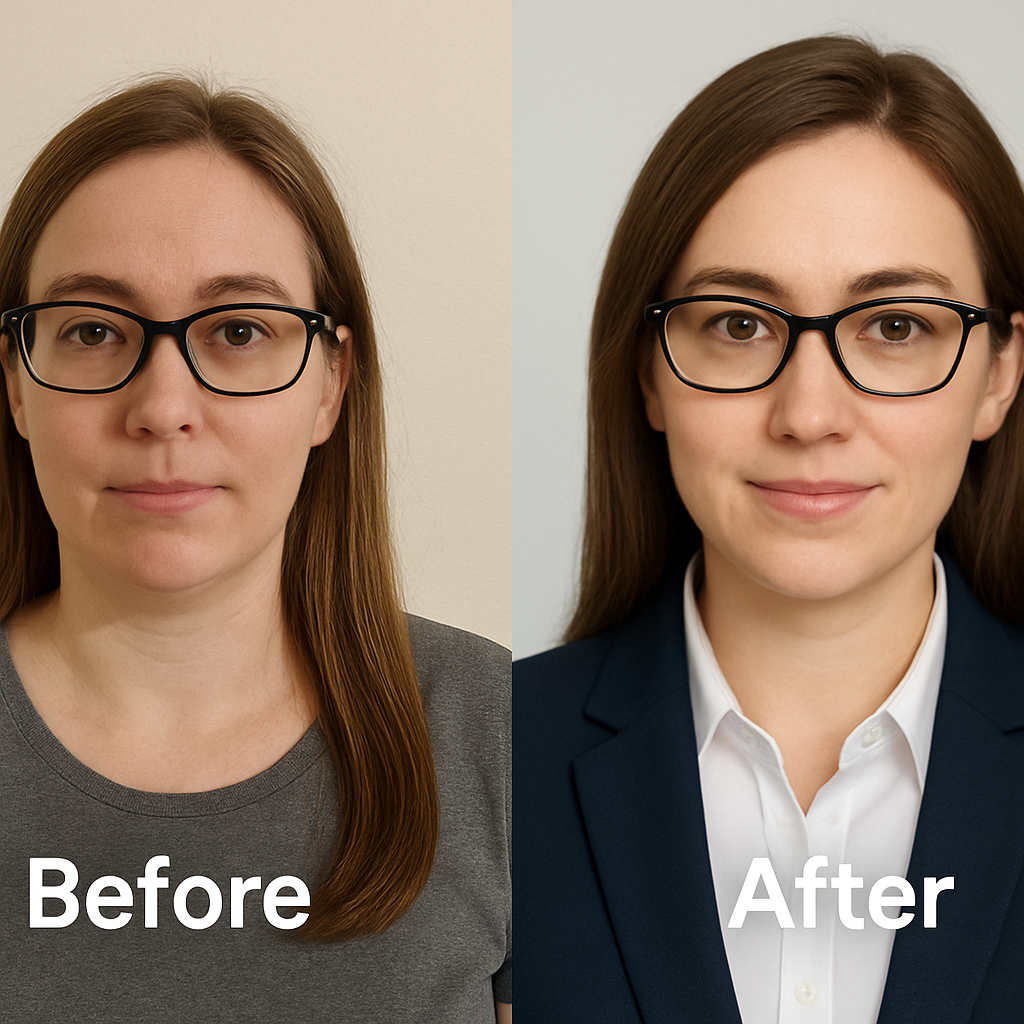
The professional landscape has shifted fundamentally in 2026. AI-generated headshots are no longer a futuristic novelty; they are a standard component of the modern professional tech stack. For job seekers, founders, and freelancers, the ability to generate a studio-quality portrait without a studio appointment is a lever for speed and efficiency. However, as adoption has surged, so has the noise. The market is saturated with tools promising "professional results" for zero cost.
This proliferation creates a decision problem. You are faced with dozens of options ranging from "100% free" utilities to premium platforms. The immediate temptation is to optimize for cost. Why pay when a free tool claims to do the same job? The answer lies in the divergence between "image generation" and "professional representation." While free tools have improved, they often operate on older models or trade data privacy for access.
In this analysis, we will dissect the 13 most notable free AI headshot generators available today. We will categorize them by their actual utility and expose the hidden costs of the "free" model. We will also introduce NovaHeadshot as the dedicated alternative. If your goal is to skip the experimentation phase and secure a studio-grade asset immediately, you can create professional AI headshots in minutes with our platform.
What Counts as a "Free" AI Headshot Generator? (And the Catch Behind "Free")
To navigate this market, you must understand that "free" is rarely a monolith. In 2026, free AI headshot tools generally fall into three distinct economic models. Each comes with specific trade-offs regarding quality, privacy, and utility.
1. Truly Free (The Loss Leader)
These tools require no sign-up and no payment. They are increasingly rare. Platforms like HeadshotMaster fit this description. The catch here is almost always infrastructure cost. Running high-fidelity generative adversarial networks (GANs) or diffusion models is expensive. To offer this for free, these services typically use lighter, older models that produce lower-resolution outputs. The results often lack the texture and lighting nuance required for professional use.
2. The Freemium "Credit" Model
This is the most common category. Tools like Supawork or Canva offer a limited number of credits or a "free trial" that generates a handful of images. The goal is to demonstrate the capability enough to upsell you. The limitation is often volume and consistency. You might get one lucky shot out of five, but you cannot generate a cohesive set of photos without hitting a paywall.
3. The "Enhancement" Loophole
Many users confuse AI generation with AI enhancement. Tools like the free tier of HeadshotPro often fall into this bucket. They do not generate a new headshot from scratch using a trained model of your face. Instead, they take an existing photo and apply AI retouching to improve lighting or background. If your source photo is bad, the result will be a polished bad photo.
The Hidden Costs: Privacy and Time
The most significant cost of free tools is often invisible. A 2026 analysis of free AI services revealed that several maintain undefined retention policies. When you are not the customer, you are often the training data. Premium services operate on a different incentive structure where data security is a feature of the product, not a loophole.
Furthermore, there is the cost of time. Time investment represents a major hidden expense with free generators. You may spend hours generating, filtering, and tweaking prompted images to get one usable result. Professional tools are designed to compress this timeline into minutes.
Quick Comparison Table: Free AI Headshot Generators in 2026
Below is a snapshot of the current landscape. This table categorizes the tools based on their primary mechanism and limitations.
| Tool | Type | What's Free | Watermark? | Best For | Not Ideal For |
|---|---|---|---|---|---|
| HeadshotMaster | Web | Unlimited (Basic) | No | Quick experiments | C-Level LinkedIn profiles |
| HeadshotPro (Free) | Web | Enhancement | No | Polishing selfies | Creating new headshots |
| Canva AI | Design App | Limited Credits | No | Social posts | Photorealistic portraits |
| Supawork | Web | Limited Styles | Yes (Sometimes) | Volume testing | Consistency |
| HeadshotPhoto | Web | Enhancement | No | LinkedIn framing | Bad source photos |
| Remaker | Web | Swap/Edit | No | Creative edits | Strict realism |
| Mobile Apps | App | Ad-supported | Yes | Social avatars | Resumes |
The Best Truly Free AI Headshot Generators (2026 Roundup)
We have analyzed the market to identify the most prominent players. Here is how they stack up against professional standards.
4.1 HeadshotMaster – 100% Free, No Sign‑Up
HeadshotMaster positions itself as a frictionless solution. There is no registration required. You upload, and the system processes.
- Pros: It is extremely fast. For users who just want to see what they might look like in a suit without any commitment, it is a low-barrier entry point.
- Cons: The quality is hit-or-miss. The background generation often lacks depth, and facial textures can appear smoothed over.
- Verdict: Good for casual social profiles, but users report the tool produces acceptable results only for contexts where professional polish matters less.
4.2 HeadshotPro – Free AI Headshot Generator
While known for their paid service, the free tool from HeadshotPro serves a specific niche.
- What it is: It is an enhancer, not a generator. It cleans up an existing photo.
- Pros: If you have a decent selfie, this tool can fix the lighting and remove distracting elements.
- Cons: It cannot fix a bad angle or poor expression. It is limited by the source material.
- Verdict: Useful for cleaning up a photo you already like, but it is not a full AI re-shoot.
4.3 Canva's Free AI Headshot / Design Tools
Canva has integrated AI across its design suite.
- Pros: If you are already building a resume in Canva, the integration is seamless.
- Cons: The output often leans towards "avatar" rather than "photograph." The lighting engines used are optimized for graphic design, which can make faces look illustrated.
- Verdict: Reviews reveal consistent limitations regarding photorealism. Best for thumbnails, not primary profile photos.
4.4 Supawork / Supamove & Similar "Freemium" Web Tools
Supawork emphasizes volume, offering "100+ styles."
- Pros: You can iterate through many different looks quickly.
- Cons: Volume does not equal quality. The "uncanny valley" effect is prominent here. Eyes may look slightly asymmetrical, or skin texture appears plastic.
- Verdict: The platform prioritizes generating numerous options quickly over ensuring strict professional standards.
4.5 HeadshotPhoto / HeadshotPhoto.io Free LinkedIn Photo Generator
HeadshotPhoto.io focuses specifically on the LinkedIn form factor.
- Pros: It handles cropping and framing well for LinkedIn's circular format.
- Cons: Like HeadshotPro's free tool, this is largely an enhancement utility. It processes locally, which is a privacy plus, but it lacks generative power.
- Verdict: Good for a quick fix, but it relies entirely on your source photo.
4.6 Remaker / Generic "Free Portrait" AI Tools
Remaker is a generalist AI editor that includes face swap and portrait features.
- Pros: Versatile for creative projects where you want to blend faces or change styles drastically.
- Cons: It is not specialized for headshots. The results often look like "filters" rather than studio photography.
- Verdict: Remaker prioritizes versatility over specialization, making it better for tech-savvy experimenters than serious professionals.
4.7 Mobile Apps & "Hack It Together for Free" Approaches
The app stores are flooded with "AI Mirror" and "Magic Avatar" apps.
- Pros: Fun for social media.
- Cons: Unreliable resemblance is the primary issue. These apps often create a character that looks like you, but isn't you.
- Verdict: Avoid for professional use. The risk of looking like a caricature is too high.
Are Free AI Headshot Generators Actually Good Enough for LinkedIn?
The fundamental question is whether "good enough" is the standard you want for your career. The data suggests a gap between free outputs and professional requirements. A 2024 survey found that over 60% of users notice artifacts in AI-generated images, specifically around the eyes and skin texture.
When a recruiter or client looks at your LinkedIn profile, they are making a subconscious assessment of competence and authenticity. Common issues with free tools include:
- The Uncanny Valley: Small distortions in the eyes or teeth that trigger a psychological "something is wrong" response.
- Inconsistent Lighting: Shadows that do not obey the laws of physics, revealing the image as synthetic.
- Low Resolution: Images that look fine on a phone screen but degrade on a desktop monitor.
For personal experimentation, free is fine. But for your professional brand, the photo at the top of your resume is a high-leverage asset. It is not the place to accept inconsistent likeness.
When It's Time to Skip "Free" and Invest in a Professional AI Headshot
There is a distinct threshold where the ROI of a paid service outweighs the savings of a free tool. You should move to a professional solution if:
- You are actively job seeking: Recruiters spend roughly 30 seconds on initial LinkedIn profile screening. Your photo is the visual anchor. If it looks artificial, you risk being perceived as inauthentic.
- You are a Founder or Executive: Your image represents company credibility. Investors and partners expect a level of polish that free tools rarely deliver.
- You speak publicly: Conference organizers need high-resolution assets for print and large screens. Free tools typically cap resolution at 1024px, which is insufficient for print.
- You value data privacy: Paid services typically have explicit deletion policies. NovaHeadshot and similar platforms build their business model on security, not data harvesting.
The pattern is clear. To get reliable, studio-quality results that truly look like you, systems need better models and more compute. This inherently costs money.
Why NovaHeadshot Takes a Different Approach
We built NovaHeadshot to solve the "visualization gap" that exists between cheap AI filters and expensive physical photoshoots. We positioned our product not as a toy, but as a professional utility.
Dedicated to Photorealism
Unlike generalist tools, our models are tuned specifically for professional portraiture. We focus on natural skin texture and accurate physical lighting. The goal is to avoid the "AI look" entirely. You can see how our platform works to understand the difference in fidelity.
Speed and Efficiency
Time is your most valuable resource. We deliver results in approximately 10 to 20 minutes. There is no need to wait 24 hours for a server queue, which is common with free or lower-tier paid tools.
Commercial Rights and High Resolution
We provide high-resolution downloads suitable for print and web. Crucially, you own the commercial rights to your images. This is essential for authors, speakers, and consultants who use their image as part of their product packaging or marketing materials.
One-Time Payment Model
We rejected the subscription model for this product. You do not need a monthly fee for a headshot you update once a year. Our pricing starts around $29 for a complete package. This one-time fee covers the high-end compute costs required to generate realistic, consistent team headshots or individual portraits without the recurring billing found in other SaaS tools.
Free vs. Paid AI Headshot Generators: Which Should You Choose?
The decision comes down to your objective.
Choose a free generator if:
- You are satisfying curiosity about AI technology.
- You need a temporary placeholder for an internal Slack profile.
- The stakes for the image are low (e.g., a gaming avatar).
Choose a professional service like NovaHeadshot if:
- You are applying for roles with salaries that justify a $29 investment.
- You need the photo to look like you, not a cousin of you.
- You require a variety of backgrounds (studio, office, outdoor) that maintain consistent facial geometry.
- You need the assets immediately.
How to Get the Best Possible AI Headshot (Whatever Tool You Use)
Regardless of the tier you choose, the AI is only as good as the data you feed it. To maximize your results:
- Volume and Variety: Upload 10–20 photos. Do not just use selfies. Use photos taken by others to give the AI depth data.
- Lighting Consistency: Ensure your face is evenly lit in your input photos. Avoid harsh shadows that obscure features.
- No Obstructions: Sunglasses, hats, and hands touching the face confuse the model. Investing 15 minutes upfront to gather quality source images translates to significantly better outputs.
At NovaHeadshot, we guide you through this selection process to ensure the model has the best possible ground truth to work from.
Building Your Professional Digital Presence
The era of the $500 studio session as the only path to a professional image is over. Free AI headshot generators in 2026 have democratized access to basic image tools, serving as excellent sandboxes for experimentation. They allow anyone to dip their toes into generative media.
However, for the definitive assets that anchor your professional life—your LinkedIn, your resume, your company bio—the "free" tier often costs too much in terms of quality and credibility. When you are ready to signal professionalism and competence to the market, the upgrade to a dedicated AI headshot platform is a high-ROI decision.
Don't let a mediocre photo be the friction point in your career growth.
Ready to Create Your Professional Headshots?
Transform your selfies into professional headshots in under 20 minutes. Join thousands of professionals who trust Nova Headshot for their AI-generated headshots.